Built into Business Central. Designed for rental.

Rental management,done right.

For plant hire and equipment rental companies. Quote the job, hold the units, send them out, bill every week or month they stay out, and check them back in, with every step on documents your accounts team already works with.

Microsoft Business Central | Free in sandbox · No credit card required We reply to demo requests within one working day.
Essential Rental - Microsoft Business Central
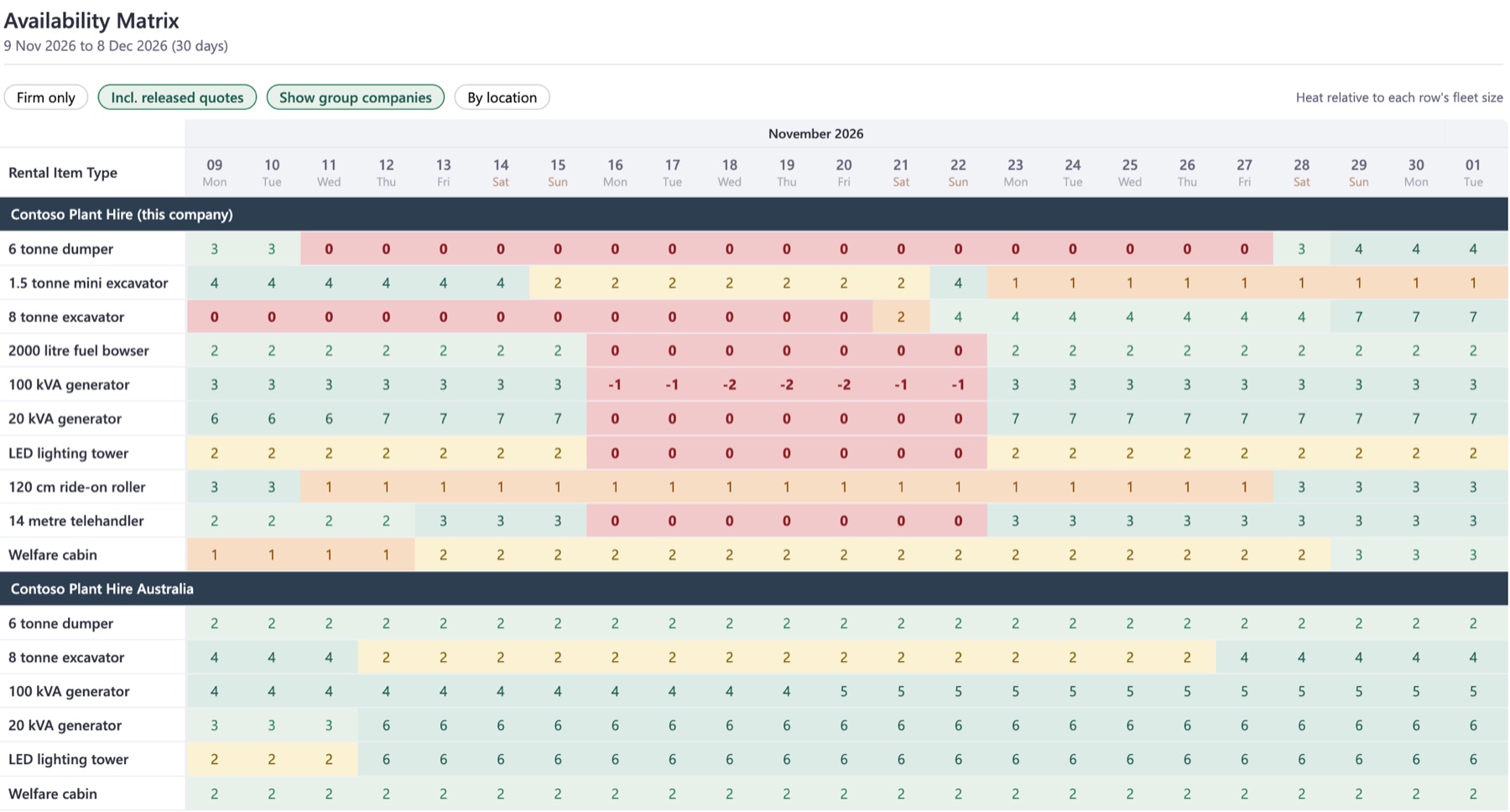
Essential Rental - Availability Matrix in Business Central

Your hire business, on one screen

Essential Rental · Business Central
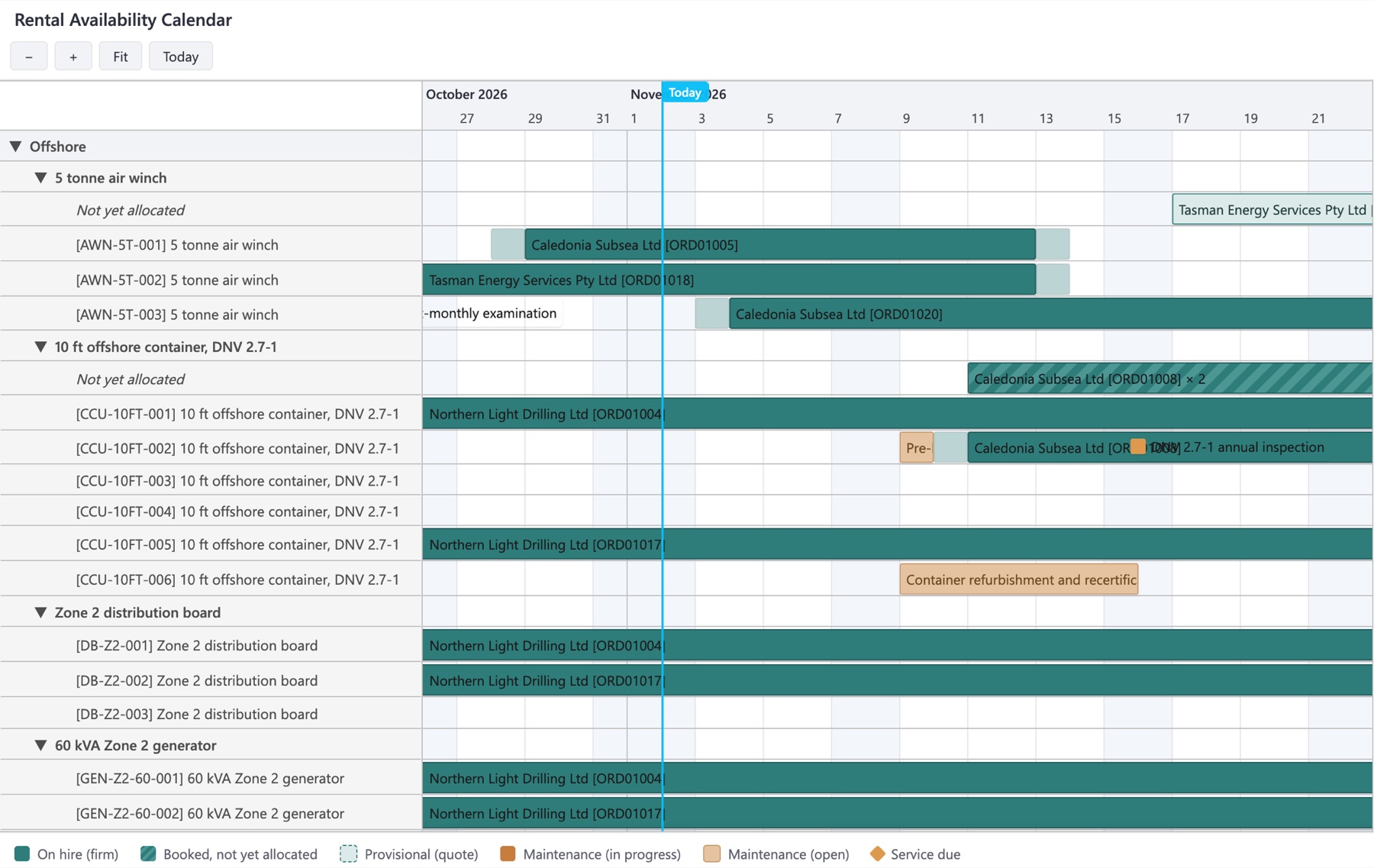
Rental Availability Calendar in Business Central
Today, and the weeks ahead

Scroll forward and back, zoom in and out, or jump to today.

Workshop time in the same view

Maintenance orders and services due sit on the same timeline as hires, so a unit going in for its inspection is never promised to a customer.

Essential Rental · Business Central
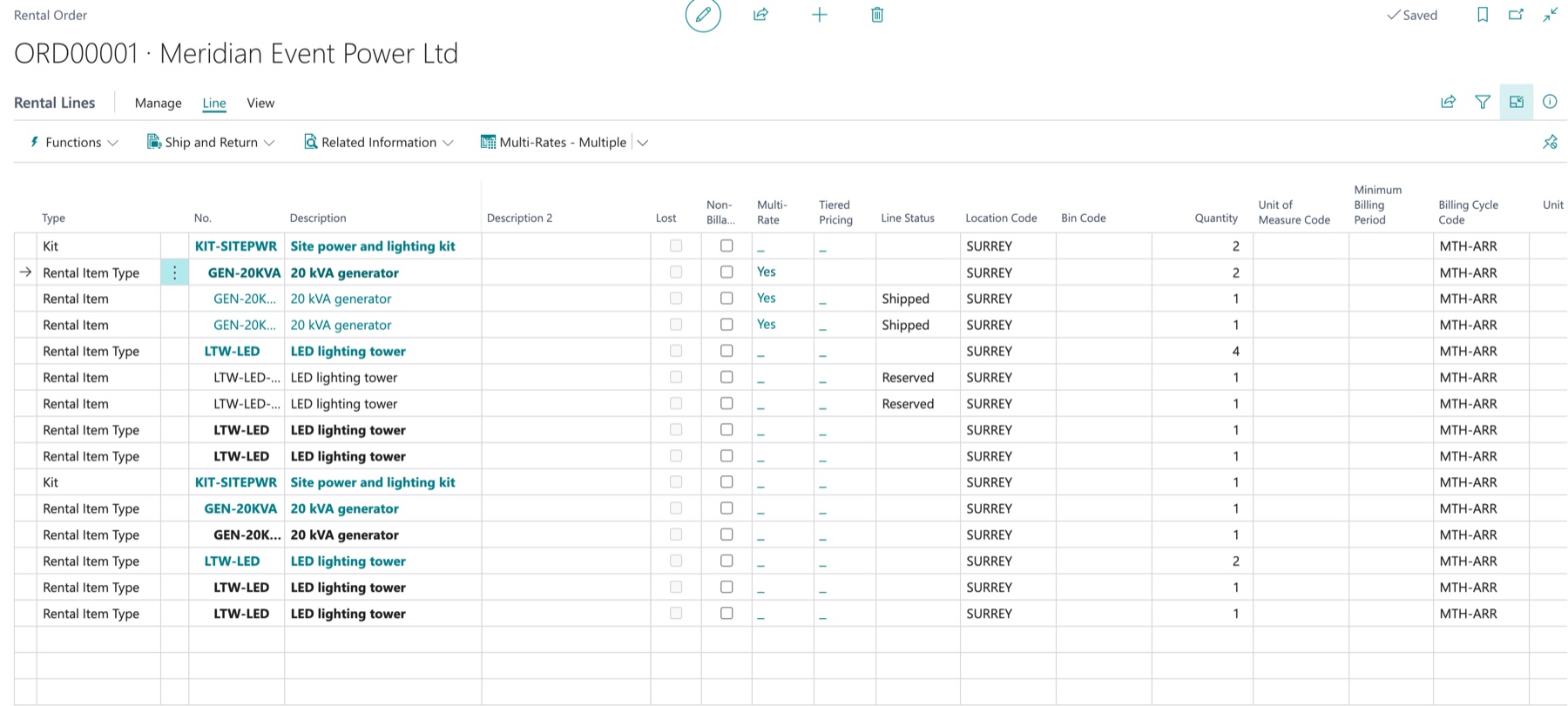
A kit exploded into its components on a rental order in Business Central
One line, the whole package

The kit line is what the customer sees and, if you price it as a kit, what they pay for. Everything it contains sits beneath it.

Ship what is ready

The generators have gone out and the lighting towers wait on backorder, each unit showing where it is. The first week of the generators is free on a multi-rate.

Essential Rental · Business Central
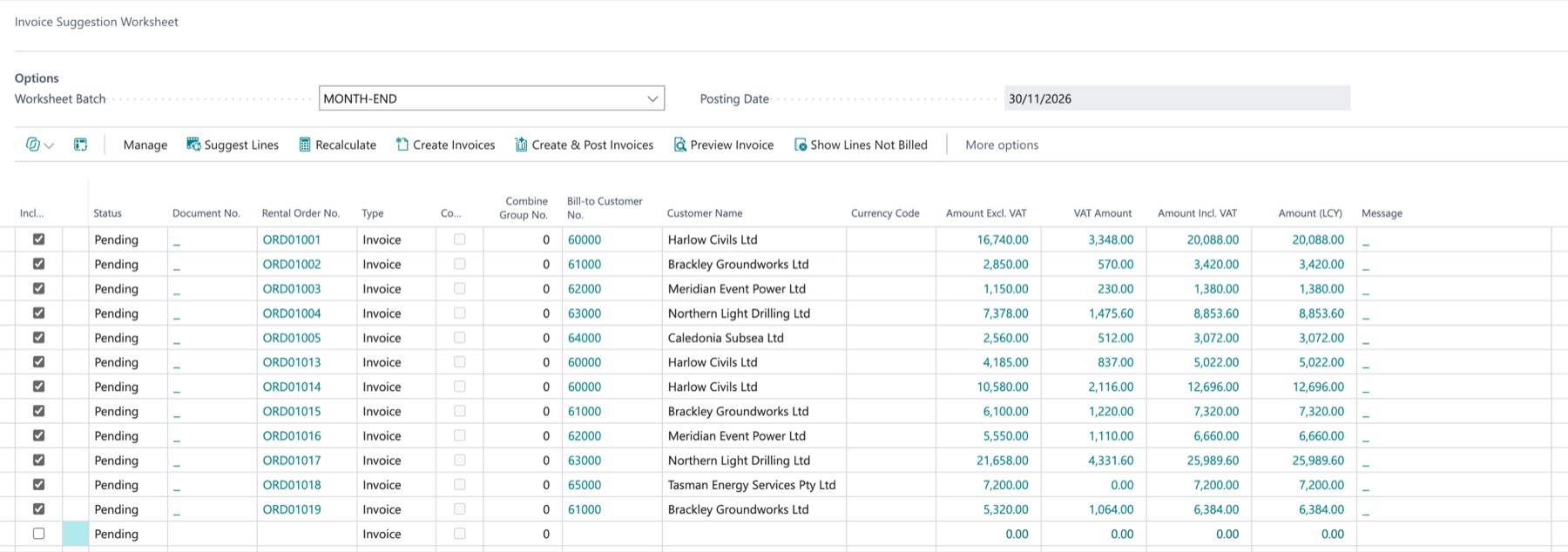
Invoice Suggestion Worksheet in Business Central
Suggest, check, post

Suggest Lines builds the run. Recalculate after a change, preview an invoice, then create or post the lot.

Every order, every amount

Each line is an order ready to invoice, with its amounts before and after VAT. On the demo company one run suggested 12 orders worth £91,271 before VAT.

Essential Rental · Business Central
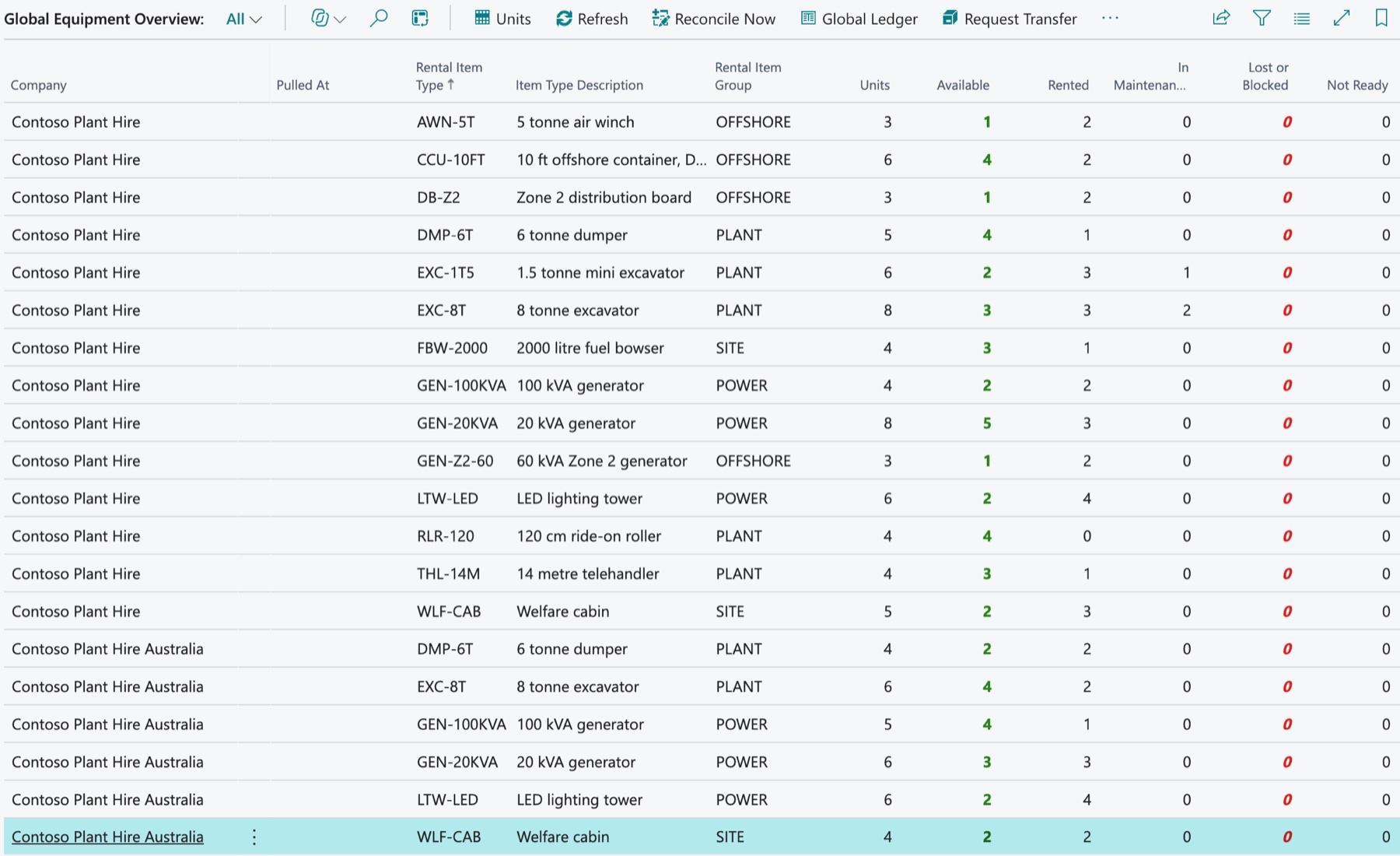
Global Equipment Overview in Business Central
Who has what, right now

Available, rented, in maintenance and lost, for every rental item type in every company.

Ask for it, don't ring round

Request Transfer asks the other company for units; the global ledger keeps track across your companies.

Essential Rental · Business Central
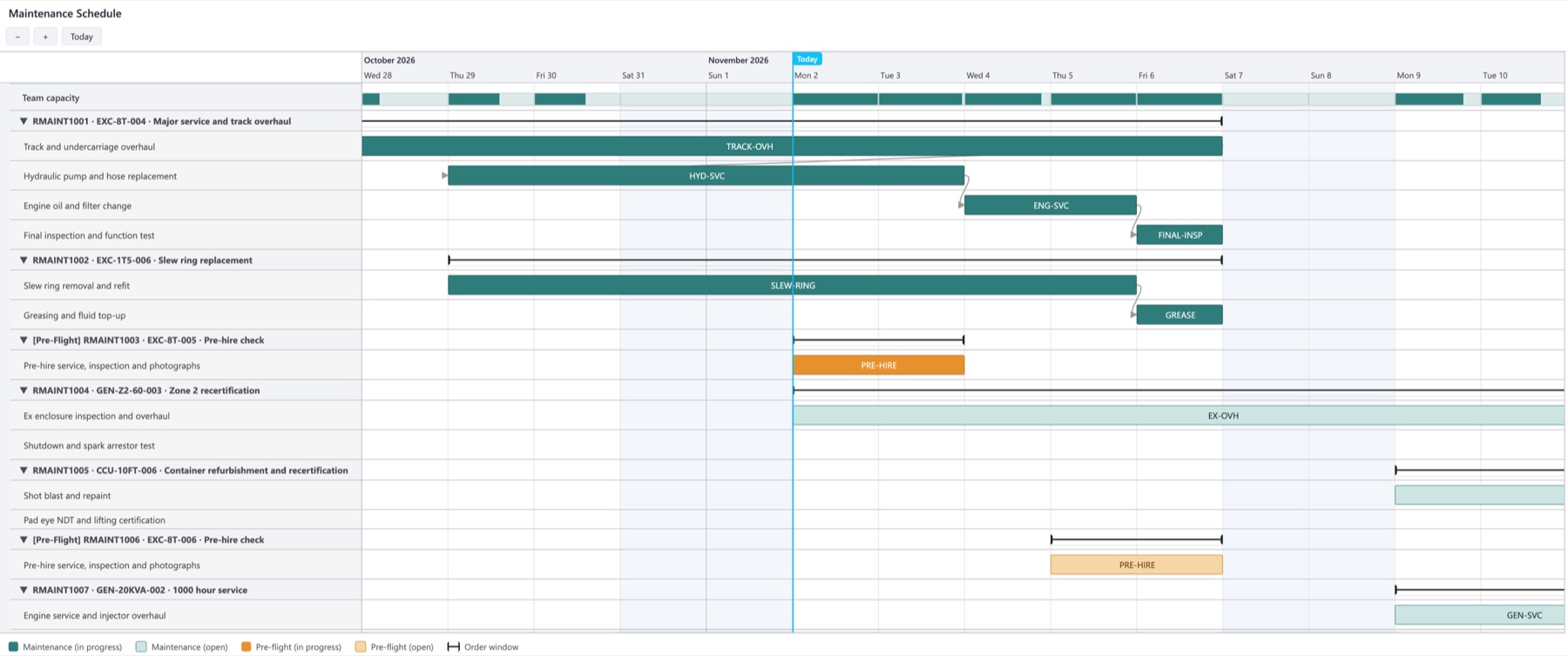
Maintenance Schedule board in Business Central
Capacity at the top

The capacity row shows how busy the team is each day, so new work lands where there is room.

Ready before it goes out

Pre-hire checks are planned before the unit's next hire starts, alongside the rest of the workshop's work.

See the whole fleet at a glance

Every unit on one timeline: who has it, what is booked next, what is only quoted and what is in the workshop.

Read the Availability guide

Add a kit and every part comes with it

Components, rental item types and the units allocated to them drop in beneath the kit line, priced as a package or part by part.

Read the Kits guide

Month-end in one run

The Invoice Suggestion Worksheet works out what every order owes and lines it up to check, invoice and post. 12 orders, £91,271, one run.

Read the Billing guide

One fleet across all your companies

Units, available, rented and in maintenance for every company side by side, with transfers a click away.

Read the Global Equipment guide

The workshop on one board

Services, inspections and certificates raised by the calendar or the hour meter, then planned against your team.

Read the Maintenance guide

Everything else your hire desk needs

All of it runs inside Business Central, and every one has a guide you can read before you install.

Customer PortalOptional

Your customers sign in to see what they have on hire, follow deliveries and collections, download certificates and, if you allow it, check their invoices and balance.

Read the Customer Portal guide

Multi-rate pricing

Different daily rates for different parts of one hire.

Scan and allocate

Scan units as they are loaded to allocate them to the order.

Containers and packing lists

Say which container each shipment line goes in, nest pallets inside containers, and print the packing list and labels your freight forwarder and customs need.

Read the Containers guide

Rental price lists

Date-effective rates by customer or customer group.

Overdue returns

Find equipment still out past its end date and put it back on charge.

Lost items

Close the hire, charge the customer and queue the asset disposal.

Approvals

Sign-off on quotes, orders and scrap requests through Business Central workflows.

Location transfers

Move units between depots and track them in transit.

Fleet acquisition

Buy fleet on a purchase order and receive it as rental units.

Rental billing flows straight into your projects

Link as many rental quotes and orders as you need to one project. Each billing run lands on the right project task, ready to invoice with the rest of the job.

  • Put each rental line on its own project task
  • Billing writes the planning lines for you
  • Task totals roll up as the hire runs
  • Every linked order on the project page, grouped by order
Essential Rental · Business Central
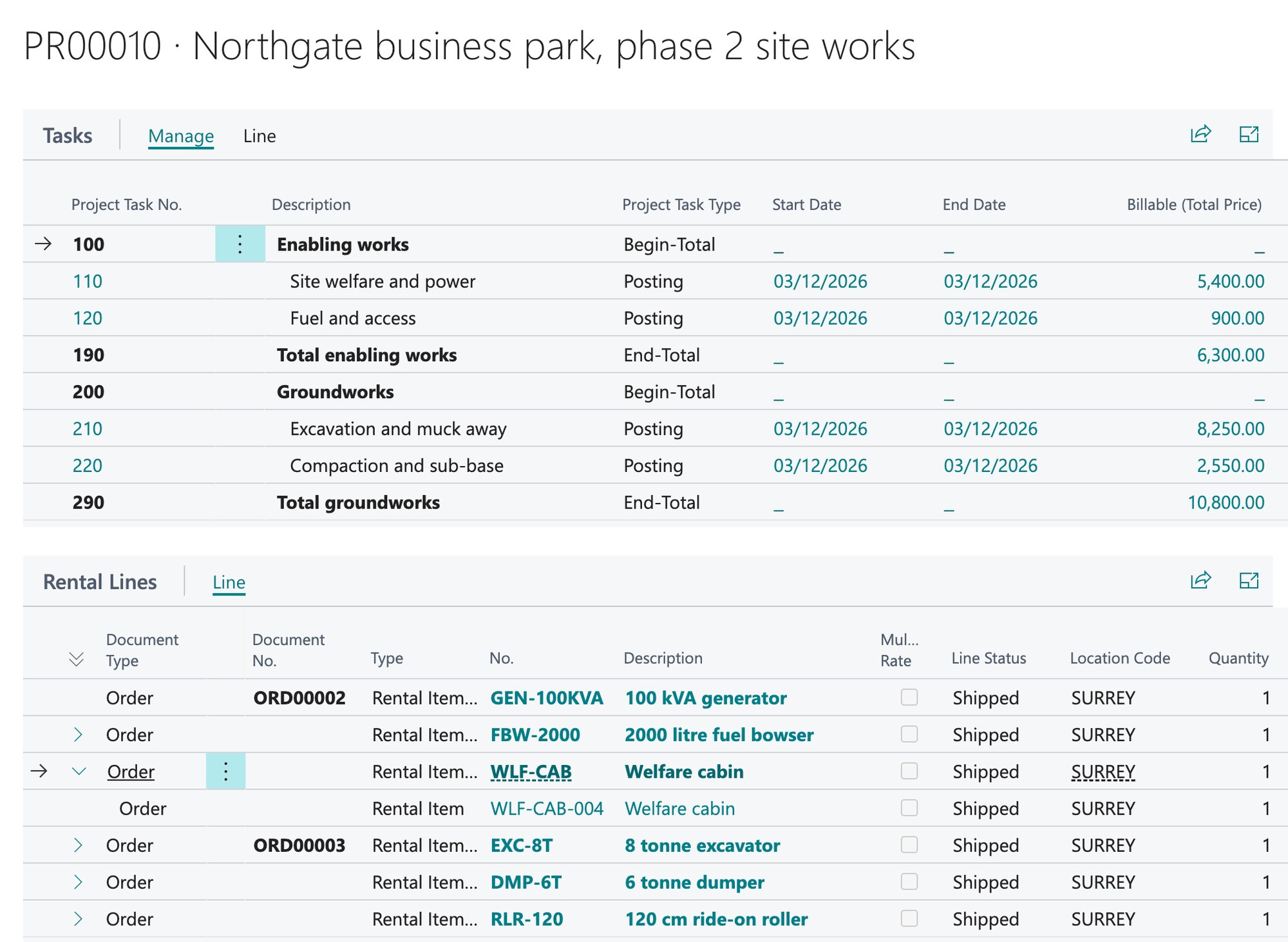
A Business Central project with rental billing on its tasks and two linked rental orders
Billing lands on the task

Each billing run writes billable planning lines to the line's project task, so the hire sits in the task totals alongside labour and materials, and is invoiced with the rest of the project.

Every order on the project

Both rental orders show on the project, grouped by order, with the units out on hire beneath each line. Changes are made on the rental order itself.

Project Rental Lines · Business Central
Billing synced

From the stockroom to the hire fleet

Bought it to hire it out? Turn stock items into rental fleet in three steps, with the fixed assets created for you.

  1. Essential Rental · Business Central
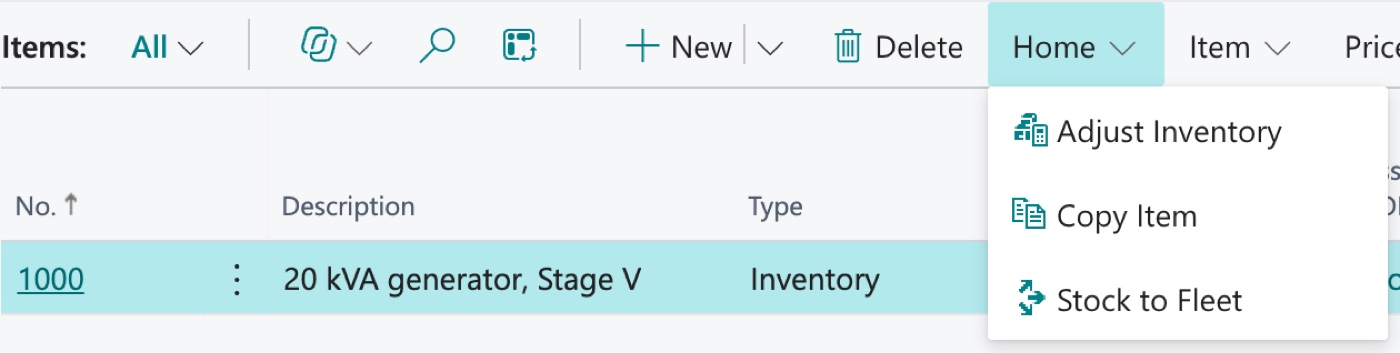
    Stock to Fleet on the Items list

    Pick the stock

    Choose the item you bought for hire and select Stock to Fleet.

  2. Essential Rental · Business Central
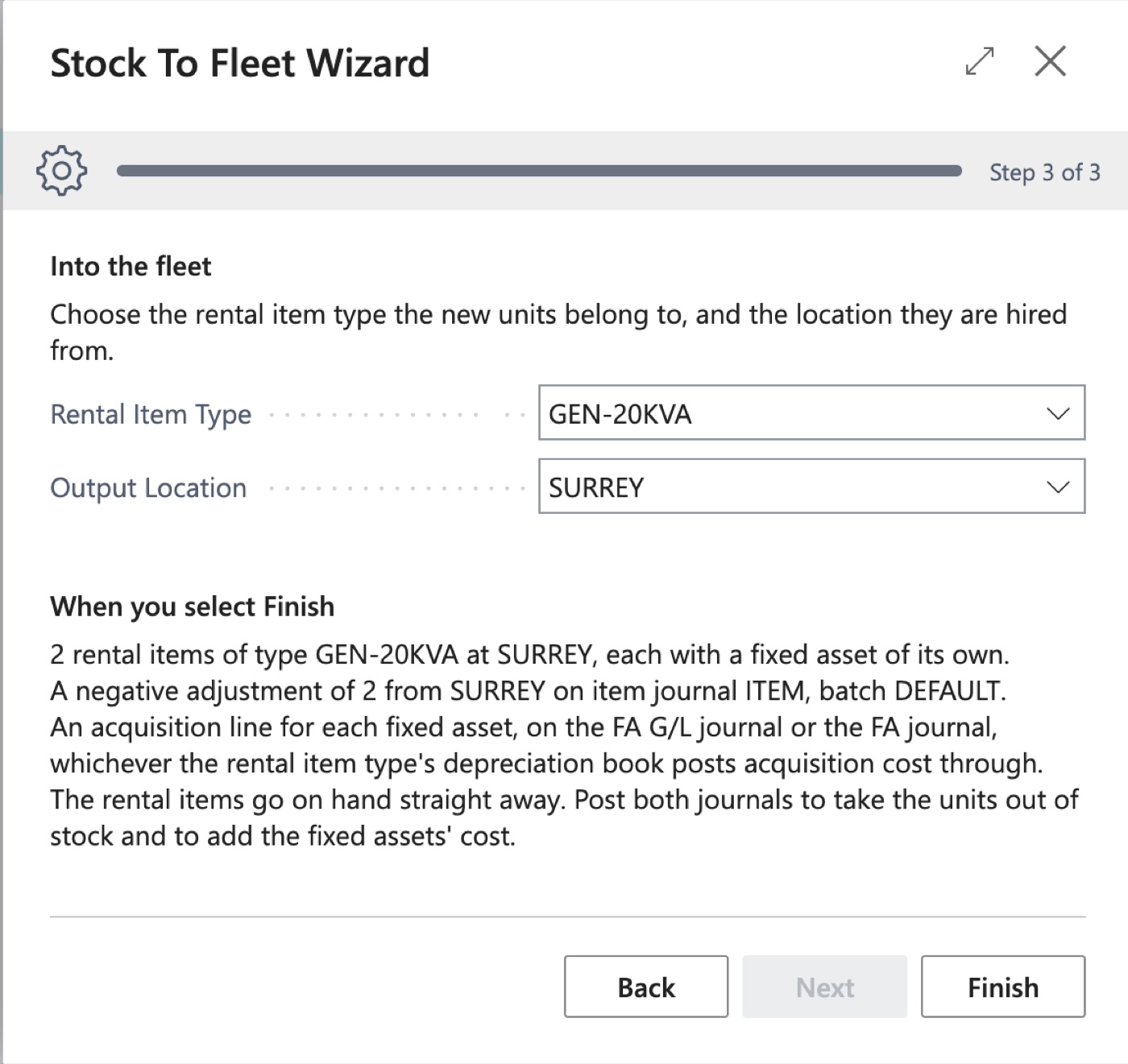
    Stock to Fleet wizard

    Run the wizard

    Say how many units, which rental item type and where they are hired from. It tells you what Finish will do.

  3. Essential Rental · Business Central
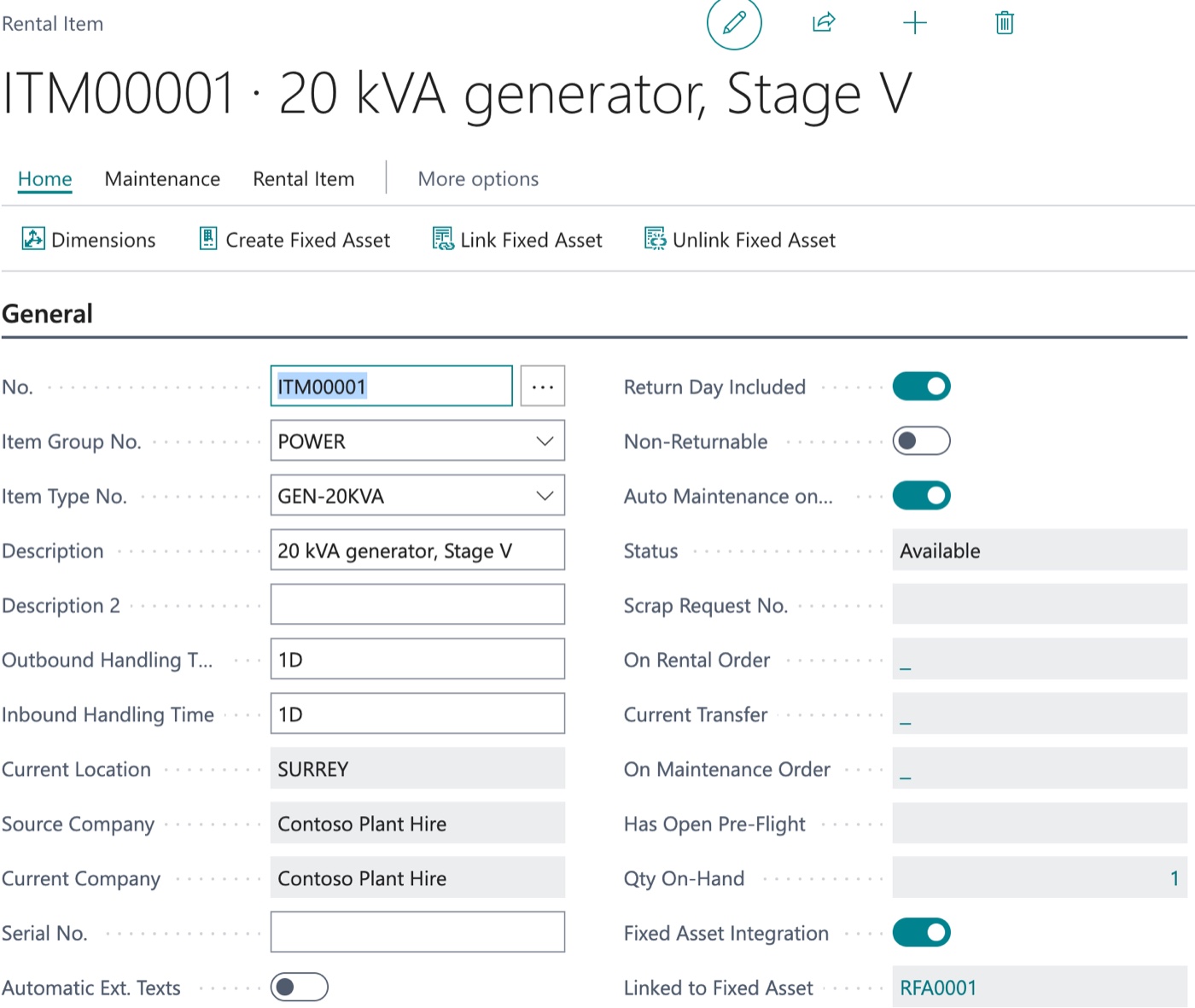
    New rental item card

    Ready to hire

    Each unit is a rental item with its own fixed asset, available straight away.

Watch Essential Rental in Business Central

A quick walkthrough of the core rental workflow, from rental order through to recurring invoicing, plus a tour of a few of our favourite features.

Essential Rental · Product walkthrough
Essential Rental · A few of my favourite features

Try for free. Scale when you're ready.

Essential Rental runs free in any Business Central sandbox, with every feature switched on and no time limit. Move to production when you're sure it works for your business.

Sandbox Environments
Free
in any Business Central sandbox
  • Every feature switched on, including the Maintenance, Global Equipment and Customer Portal add-ons
  • No time limit
  • Each new release as it ships
  • Register on the setup page to start
Microsoft Get it on AppSource
Production Environments
On request
Price on application, per production company
  • Backed by the people who build Essential Rental
  • Every update for the life of the product
  • Your feedback shapes the roadmap
  • Optional add-ons, priced separately: Maintenance, Global Equipment, Customer Portal
  • Customer Portal runs on your own web server; we supply the portal app on request
Get in touch

Product roadmap

Essential Rental is actively developed. This is what we're building next. Get in touch if you'd like a say in what ships first.

ePOD integration

Proof of delivery and collection captured on the driver's device, with a signature, and recorded against the rental shipment or return.

Logistics

Bulk items

Hire consumables and interchangeable stock by quantity, with no named units to allocate, pick or check back in one by one.

Operations

Maintenance recharges

Charge the parts and labour from a repair to the hire the unit came back from, as a one-off line on that rental order.

Maintenance

Already delivered

Read the release notes
  • Multi-rate pricing
  • Kits
  • Approvals
  • Fleet acquisition
  • Equipment maintenance
  • Availability calendar
  • Global Equipment
  • Customer Portal
  • Containers and packing lists
  • Document dimensions

Roadmap is indicative and subject to change  ·  Prioritised by customer impact and feasibility

Ready to transform your rental operations?

Get started for free in your Business Central sandbox - all features enabled, no time limit.

Microsoft Get it on AppSource Read the Documentation Download the Product Overview (PDF)